One of the strengths of linux is it's total flexibility. If there's one tool for the job, chances are there are another dozen that you don't know about yet. For ADD tinkerers such as myself, this blessing is also a curse! ;)
All that aside, recently I found Darktable. It's a RAW workflow software, based on the excellent DCRaw converter that is practically ubiquitous in linux, and even sneaks into more well known software (rumor has it that adobe based their raw conversion off of this as well).
At first glance, lightroom users will feel right at home. The dark interface, thumbnail view, and even the "end flourishes" look remarkably similar, and with good reason - it's a nice layout. Darktable has a nice feature called "zoomable light table", which basically allows you to drag the images around as if you were panning on an actual table. You can still scroll by using the "file manager" view (which is almost identical), but I'm impressed with the speed of the light table view.
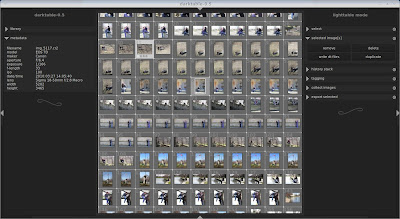
of course, you can always zoom, re-order, filter, tag, group, etc. Both sidepanels (as well as the top and bottom panel) are collapsible, so you can use practically all of your screen for viewing. Nice touch.
Double clicking on an image brings you to the "Darkroom Mode". This is where all the heavy lifting is done.
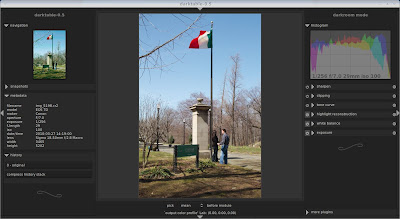 On the left, you see your navigation, snapshot, metadata, and history windows (all collapsible, of course). The right, your histogram and various "plugins". The creators of darktable really went out of their way to make sure there was no wasted space. The histogram is not only a display, but it allows you to adjust the exposure by simply clicking and dragging right on the histogram. Nice touch for quick adjustments.
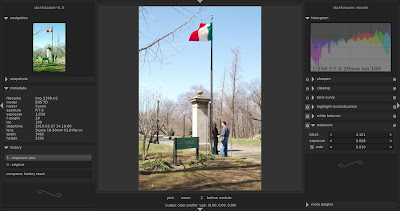
Everything you'd expect in a RAW processor is there, and even some you may not expect. For example, one thing that really impressed me was the "Auto Exposure". Not that it had it, but the way it actually works. Take a look at this screen shot:
White balance is done in a similar fashion. You have the option of presets, or you can select an area. You're not just stuck with a small pixel area.
Monochrome is done very well, if not a bit different than other tools. You simply activate the Monochrome plugin (if you don't see it, go to "More plugins" at the bottom and click the icon), then you get this view:
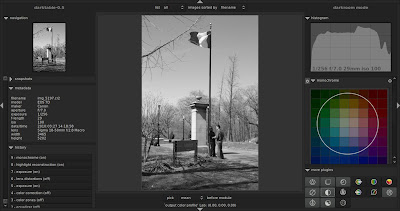
by dragging the circle around the color palette, you can adjust your monochrome filter. Using the scroll wheel allows you to focus in on single colors (and makes the circle smaller) or to have a more balanced filter (thus making the circle larger). Very fast, very intuitive.
There are some oddities as well (to be expected for a version 0.5). You'll see a plugin called "clipping". Most photographers would think this means blown highlights or blocked up shadows, but they're actually talking about cropping. The "Equalizer" tool apparently is for noise reduction. When exporting, it doesn't tell you where the images will be (they're in a folder under your raws called "darktable_exported", btw). There's no cancel on the export, and for some reason on my system it set the initial quality of exported images to zero. (I can tell you, a zero quality level results in some very, very bad images....lol)
Of course, there are some things I'd like to see. The ability to work on multiple images at once, and presets are almost a requirement for anyone doing high volume work. The great part about open source software is the people that write it are real human beings, and actually respond to questions, suggestions, and emails. You have to love that!
Overall, I was very impressed with the speed which it responded. Very rarely was I waiting on the program to do anything. Many times with RAW conversion software, you are waiting on the software to re-convert the image when you make adjustments - not so with darktable. It was always quick and snappy to respond to even the most complex adjustments. The interface was easily on par with the commercial software I use, Bibble5. It's not on the same level as bibble in many aspects (conversion speed, workflow speed, noise removal, among other things) but it does very well, and has the potential for great improvement. I'll be watching it closely!
You can download darktable from their website: http://darktable.sourceforge.net/
Ubuntu users can install with the software center by adding Pascal deBruin's ppa: ppa:pmjdebruijn/ppa
Until next time!
Shan
If you're looking for a quick and easy way to create collages or album spreads in linux, look no further than Picasa from google. A small but very useful tool is the collage creator. Simply select the images you want on the collage, click the "Collage" button at the bottom, and it will open the collage dialog.
On the left, you'll see settings. Notice down at the bottom you now have the option of adding a custom aspect ratio.
This tiny feature now allows you to create custom sized albums! From the limited time I've used it, it appears the resolution is fixed at 256DPI, so this my 20x10 spread creates an image with 5120x2560 pixels. Maybe not optimal 300DPI for a 20x10 album spread, but very acceptable.
If you want full control over the size and location of your images, just select "Picture Pile". If you want just a quick, full page collage, choose "Mosaic".
Now if we can just get a touch more control over the borders (right now, they are fixed size and color - white only) and the drop shadows (no adjustments now), but overall, super quick and easy!
For you non-coding people out there != means "does not equal".
I wanted to post this thread to hopefully dispel some of the more common Linux myths out there. For most people, the thought of running linux ranks somewhere below cutting your own arm of with a rusty knife and dental surgery without novacaine.
This really couldn't be further from the truth. I've been running linux for the past 3 years, and many people I know have switched (including Stephanie, my brother, and my 60 year old mother!).
First, a few things so everyone understands the linux philosophy:
There are several distributions, or flavors, of linux. I personally use Ubuntu, but several other popular ones are OpenSUSE, Knoppix, and Debian. Each is maintained by it's own community, and have slight variations, but all run a linux kernel, or core. Each distribution may even have it's own derivatives. Ubuntu, for example, is based on Debian. Derivatives of ubuntu include Kubuntu (which uses the KDE desktop, more later), Edubuntu (which is focused towards education), Xubuntu (which is very lightweight for older machines), and Linux Mint (which is designed for simplicity, and has most multimedia plugins already installed).
Unlike Windows or Mac, linux offers several desktop environments. KDE and GNOME are the two most popular, but there are others. For simplicity, KDE has a more "windows" feel (with a start button and floating widgets), while GNOME has a more OSX feel (with the menu bar across the top). Both are feature rich and totally customizable, and have their own strengths. You can have both installed on the same computer and use them interchangeably.
Most linux distributions have a built in Package Manager, which is one of the great strengths of linux. To install software, one usually just goes to the package manager (known as the Software Center in Ubuntu), selects the software they need, and hit Install. The package manager automatically downloads the software from the repository (an online storage center for the software), and configures it for you. Think of it as an "Add/Remove Programs" on steroids. This also greatly simplifies updates, as the package manager not only automatically watches for updates in the OS, but if any changes are made to the software you have installed, it will usually automatically update that as well.
That being said, let's look at some myths:
Myth #1: Linux is too hard.
This really couldn't be further from the truth. Most desktop linux distributions are amazingly easy to use, very intuitive, and have several features that make them much easier than their windows or mac counterparts. Yes, some things are different, but different does not always mean hard. The software center, for example, is a great system to keep everything up to date and find new software. As far as installation goes, every system I've installed took less than 20 minutes, and it automatically detected and configured everything, including dual monitors, network printers, wacom tablets, you name it. To borrow from apple's great marketing, It just worked.
Myth #2: My _________ isn't supported.
This is kind of a vague myth, but a common one none the less. People seem to think that linux doesn't work on new or certain hardware. To be honest, I have yet to find something that didn't just work. Printers seem to be the most common, but lately not only have I not seen it work, but when I went to configure it after installing linux, it had already done it for me. I'm currently running dual monitors, several external hard drives, just purchased a new dvd burner, and had to do exactly ZERO config (unless you count telling it which side each of my dual monitors sits, but that's hardly difficult!)
Myth #3: I can't calibrate my monitor, so I can't use it for photography.
This is really a two part myth. First, you CAN calibrate your monitor under linux. ArgyllCMS supports many calibration devices, including the spyder and huey. It is actually creates a much more detailed profile than the software that came with my spyder, which results in even closer color matching. For those who don't have a calibration device, you can easily install the gamma adjustment software (like Adobe Gamma) to get a "close enough" manual calibration. Secondly, most of the software (both free and commercial) that runs on linux does support monitor profiling, so you can use it for photography.
Myth #4: My software doesn't work with linux.
This myth is probably true. There is a program called WINE, which emulates windows interprets windows calls from windows programs. Many windows programs work under WINE, without any speed sacrifice. (In fact, batching in photoshop is actually faster under WINE, because it doesn't redraw the screen every time. Go figure.) It isn't perfect, though, and can be a source of irritation. (Canon's DPP has a glitch that makes the folder tree look weird. You have to hide and show the tree to fix it).
The thing is, practically every program you currently use as a linux equivalent, and it's usually FREE. Yes, you read that right - free. The linux community has millions of people, and if a vendor doesn't provide a linux version, someone has probably written one. For example:
Photoshop -> GIMP (GNU Image Manipulation Program)
InDesign -> Scribus
Illustrator -> Inkscape
Premier -> KDENLive
MS Office -> Open Office
Lightroom -> Raw Therapee (or my personal favorite, Bibble)
Yes, I can already hear people screaming: Well, GIMP doesn't handle 16 bit, this doesn't do that, it's DIFFERENT, yadda yadda yadda. I'll get to the 16 bit editing in GIMP in just a second, but honestly, most of the issues are the fact that it is different. It will be. There are some big advantages (as well as the big disadvantage: the learning curve).
Myth #5: GIMP doesn't handle 16 bit, so it's useless for photography work.
You're right - GIMP (in it's current form) doesn't handle anything higher than 8 bit images. Here's the thing: when do you need 16 bits of information? The development stage. When you're converting from RAW, you absolutely need software that can handle all the information stored in that format, otherwise it's pointless to even shoot raw. A good conversion program (such as Bibble or RAW Therapee) will allow you to convert your raw file into a well exposed 8 bit JPG. How many of you actually export to 16 bit TIFFs? While I'm sure there are some, for the most part, it's a waste of space. Printing on photographic paper? 16 bit TIFFs are overkill. You just won't see the difference between a high quality (8 bit) JPG and a 16 bit TIFF print. Pixel peepers aside, the end result is, for all intents and purposes, the same.
So now that you've converted your RAW files into high quality JPGs, GIMP handles them just fine for you final retouching, actions, and finishing.
You say I haven't convinced you that 8 bit is good enough? Fine. Get Cinepaint, the 16 bit version of GIMP (although it's based off an older version of GIMP, and doesn't have quite as many features).
Myth #6: Linux isn't professional enough for photography.
Well, hopefully you feel that we're professional, but in case you want further proof, take a look at Hollywood. Most of your big name studios (Pixar, Dreamworks, Sony, ILM) all use linux rendering farms. http://www.linuxmovies.org/
So there are some of the more common myths. The question remains, why should I bother? It seems like lots of work just to get back to where I currently am now. Well, here are some of the linux advantages:
No viruses.
There are currently no viruses that affect a linux desktop (a la Macs).
Faster (oh so much faster).
With such a small overhead, running linux usually results in a 10-20% increase in speed. Boot times are in the seconds, not minutes. In fact, Ubuntu 9.10 gets to the login screen on Steph's computer in under 30 seconds from totally off. From standby, it's even faster.
Stays faster.
With no registry to corrupt, linux practically stays as fast as the day you installed it.
Lower cost.
Seriously, this is a huge benefit. When was the last time you got free updates on practically ALL your software?
An amazing community of support.
Linux users are extremely helpful, and chances are if you're having a problem, several hundred have had the same problem before you. Google gets you results faster than most support companies can even finish their first pre-recorded welcome message. If you want "commercial quality" support, that's available too from several places. Canonical (the company that sponsors Ubuntu) offers professional level support at an amazingly low cost: http://www.ubuntu.com/support/services Google sponsors the Summer of Code, where they pay students to update, create, and fix bugs in open source software.
More hardware options.
Macs are great, but when was the last time you saw a 32 core mac? I know there's a rumor about a 16 core, but 32? Last year at WPPI I worked with Bibble Labs and got to play with their 16 core AMD. Talk about amazingly fast. It appears they may have some other stuff in the pipeline too:


Macs are limited to their own hardware. While the products they offer are top shelf, they are hardly cutting edge. With linux, you get the best of both worlds: fast, secure OS with cutting edge hardware. You also get all the other perks too (not least of which everyone thinks you must be a genius to be able to run linux! [;)] )
Ok, so that's all I have. I've tried to be as un-biased as possible, and if I've missed anything, I'd love to know. Hopefully this will have opened some minds to the thought of linux as their next operating system. If you have any questions, I'll be more than glad to help in any way I can.
Shan
Well, for the past few weeks, I've been working on a little personal project: Running Linux as my main OS.
Why Linux? Don't most people use Windows or Mac?
Well, to answer the second question, that's a definite maybe. Since most linux distributions are free to download and use, it's hard to get a firm number of the actual users out there. The fact is linux is an extremely stable, low overhead powerhouse of an operating system that has been gaining in popularity over the past few years. Google recently released a linux version of their great picasa software, Disney/Pixar is using linux for all their work, and just about every website you visit is run on linux. Dell has recently started offering computers pre-loaded with linux as well - a big player in the linux corner.
So why doesn't everyone use linux?
Linux's strength is also it's biggest weakness. Based on "open source" (meaning the source code is free to download, modify, and basically do whatever you'd like!), this results in several "flavors" of linux. Kind of like Windows 98, Windows XP, and Windows Vista, except that software for one "flavor" usually won't work directly with another. Since nobody actually "owns" linux (this point can be argued), there isn't a huge marketing campaign to sell it. Novell came up with a few great ads:
I've been playing with Xandros (a commercial version) as well as ubuntu/kubuntu (a free version). So far, it looks like kubuntu is my personal favorite - a natural feeling desktop, lots of easy to install software, and a very large user base. http://www.kubuntu.org/
So what have I been trying to accomplish?
A streamlined, fast workflow.
Here's what I WANT from my system:
- Download the images from my cards
- back them up to DVD
- easily sort, adjust, and crop the keepers
- retouch as needed
- convert from raw OR create a customer JPG disk and prepare images for upload
- back up finished images to DVD and put on the network storage
- design an album to put online
So far, here's what I've come up with:
Digikam - handles #1, #2, most of #3, some of #4, and #5. Adjusting and cropping with digikam is done individually, rather than in batches, so it is rather slow. I'd prefer a DPP or lightroom style interface where the adjustments are stored separately from the original file.
Picasa - handles #1, #2, and #3, and #5. Missing #4, but it does offer the option to add in another program to edit. I like the fact that the adjustments are kept separate from the original files (and if you save the changes, it backs up the originals). It is missing some major features like curves, but does an extremely good job with their "fill light" tool.
Lightzone - great concept, too slow for real use.
I'm kind of stuck on #7. While my lab offers album design with their ROES software (which runs no problem), I've always found that method to be slow and cumbersome. On my PC, I really like Fotoslate and FotoFusion - and nothing really comes close. I've tried scribus, OpenOffice presenter, etc. Sorry, still not close to fotofusion.
As far as #4 goes, I keep hearing the same things: GIMP (ugh), Pixel (not bad, still buggy), and Krita (close, but seems to run way slow!). The GIMP is the closest thing to photoshop, but the interface isn't user friendly from a photoshop users POV, the "gimpshop" alternative isn't much better (and usually a few releases behind GIMP). I'm going to play with running PS with wine (a windows emulator) and hopefully that will solve that problem. The good news is Google is putting money into making photoshop work with linux. They really seem to be working on the open source front. Kudos to Google!
Another great program that I would love to see native for linux is faststone (faststone.org). It works good under wine (faster than some of the native linux apps), but honestly they're both on the same team, and it would be another great ally for linux.
Some miscellaneous things - Color calibration - argyllCMS works great (much more in depth than any other calibration software I've seen!) but it desperately needs a GUI. Running console commands, while plenty powerful, really are a stumbling block for people new to linux. Anyone up for writing a simple front end?
Email, word processing, spreadsheets - I love Thunderbird (use it on all my computers!) and Open Office (I haven't touched MS Office in 3 years!). Kubuntu comes with Open Office, but you have to add Thunderbird (while you're at it, download and install Firefox as well - much better than the Konqueror that comes with Kubuntu).
GNUCash seems fine for accounting (quickbooks replacement). Not much else I can think of needing.
So, any programmers out there want to create the missing album design software? Here's some thoughts:
Pages should be stored as XML documents, with links to the original images, rather than layers.
Some design as 2 page spreads, others as single pages. Double page spreads may need to watch a gutter - so having a "safe" margin is a good idea.€
Some common book sizes: 8x10, 10x10, 11x14 (all in both landscape and portrait orientation).
Things photographers need / use: Cropping, opacity, borders, masks, gradients, drop shadows, bevels, text. Export to JPG or TIFF.
Tilt the image / tilt the frame should be separate (straightening an image, having a frame off axis, or both!)
Adjust how to crop an image inside the frame.
Some simple operations, such as B&W or Sepia, sharpen / blur would be nice.
Export and share templates!
See which images have been used.
Find images again if they are moved (like a jump drive that gets mounted differently each time)
Image Magick has all of this functionality already for rendering the final images (pages). Someone would just need to create a graphical "front end" that has a nice interface, and that can quickly and easily be operated.
For now, I'm still using my Vista computer - but I have kubuntu on every computer that can take it. If you're looking for a super stable, virus free environment to do your daily work, give it a look!
(Told you I was a geek!)
Lots more later - we're getting ready to head to Las Vegas for WPPI - and I have lots of stories about the huge snowstorm we just got. I just wanted to share my personal project!
Shan
Contributors

- Shannon Smith, 831 Photography
- Akron, OH, United States
- Photographer, Trainer, Geek. Don't even get me started about lighting techniques!
Useful stuff...


